How Git Could Have Saved My Friendship
git
I wish I had treated one friendship more like a shared Git history. This note explains commits, branches, conflicts, rebasing, and recovery through the mistakes that made that comparison uncomfortable.
Git coordinates changes in software by recording snapshots, preserving ancestry, exposing conflicts, and keeping recovery paths after mistakes.
While learning those mechanisms, I kept finding names for failures that had happened outside source code too.
The technical details here are real Git behaviour. The friendship is why I remember them, since people keep much worse version histories than computers do.
The premise. Good version control cannot prevent change, disagreement, or mistakes. It keeps them visible while there is still enough context to understand them.
Git is a model of history
Before learning commands, it helps to understand what Git stores. A repository is a content-addressed object database whose commits form a directed acyclic graph. The folder of working files is one view of that database.
A commit points to a tree representing a project snapshot, metadata describing the change, and one or more parent commits. The parent links are what turn isolated snapshots into history.
commit
├── tree
├── parent
├── author
├── committer
└── message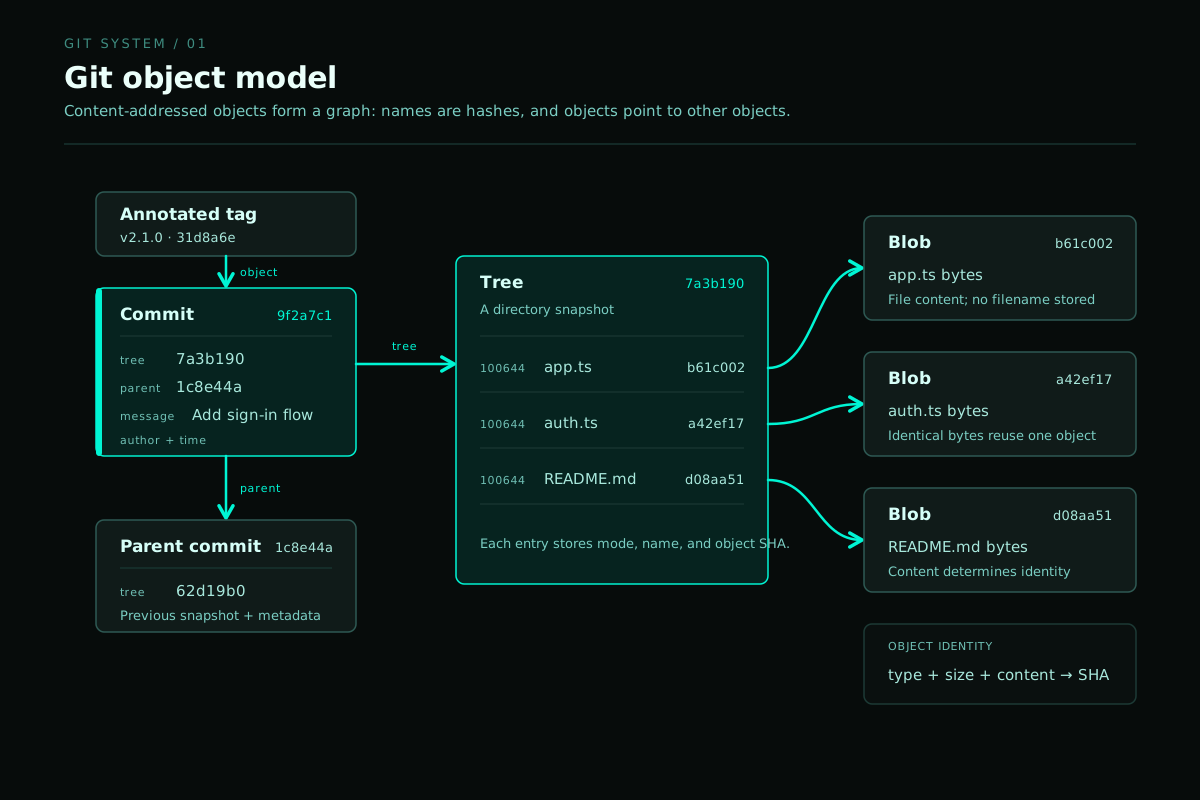
I used to argue about history as if one person owned the document. A Git graph keeps the shared ancestry, explicit changes, and eventual divergence in the same record.
Uncommitted changes
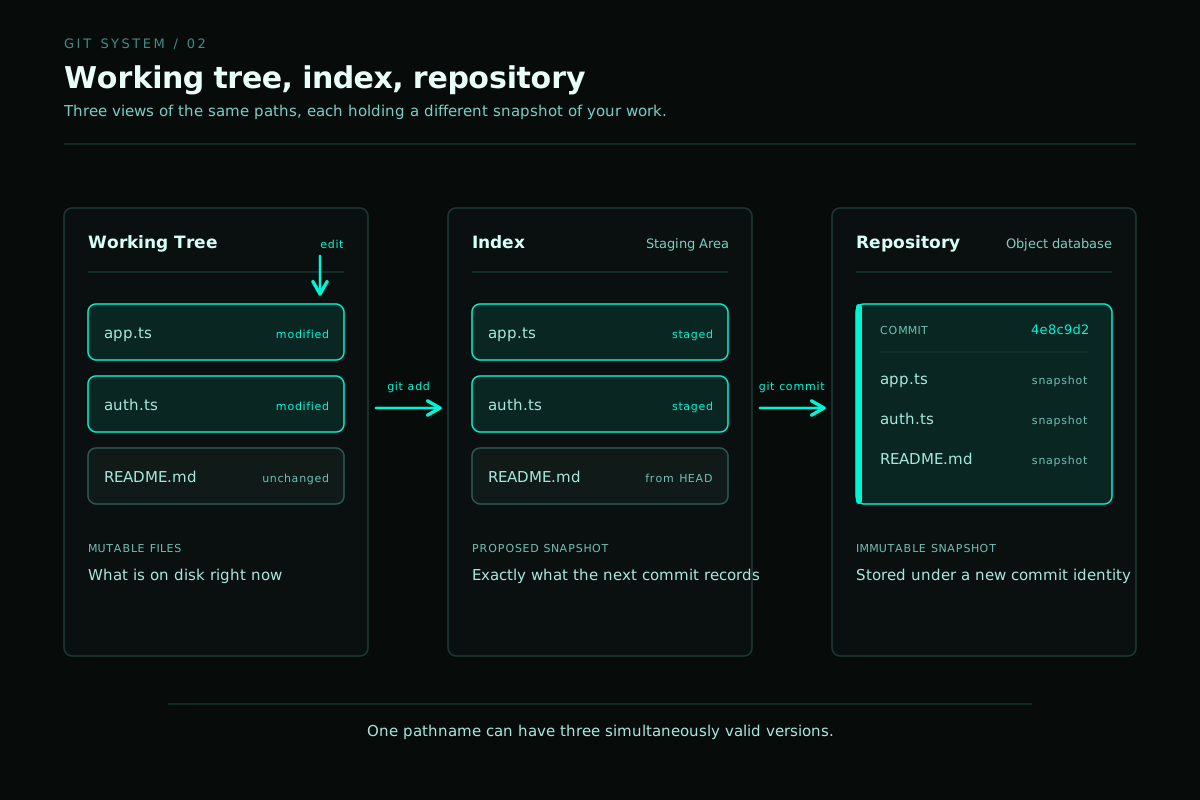
A normal Git repository has three states that beginners often collapse into one:
| Working tree | The files currently visible and editable on disk. |
|---|---|
| Index | The exact snapshot being prepared for the next commit. |
| Repository | The committed object history stored under .git. |
git status
git diff
git diff --staged

git add path/to/file
git commit
git add copies the chosen content into the index and prepares
that exact version for the next snapshot. Tracking a file is only part of
what the command does.
My friendship did not end with one catastrophic commit. It accumulated a working tree full of changes that we never inspected, named, or shared.
Branches are movable references
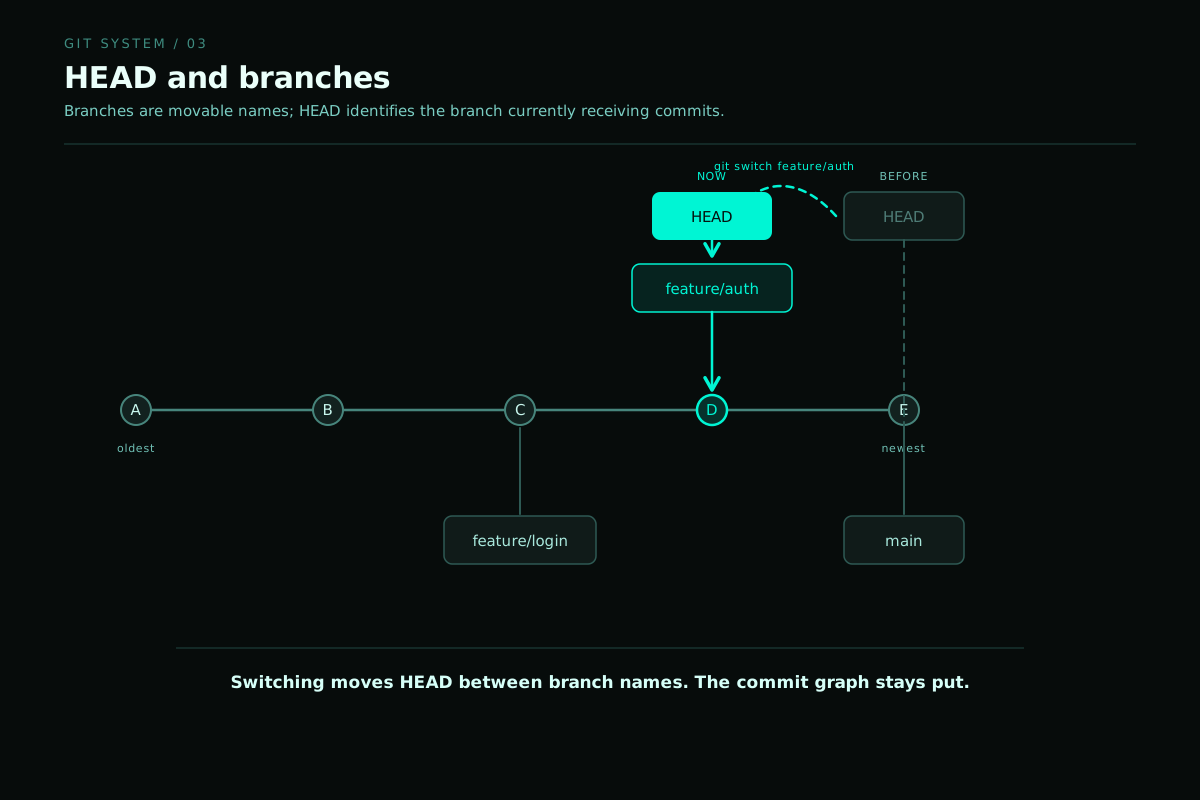
A Git branch is a lightweight name pointing to a commit rather than a separate copy of the project. As new commits are created, the active branch reference moves forward.
git branch
git switch -c feature/new-direction
git log --oneline --graph --decorate --all
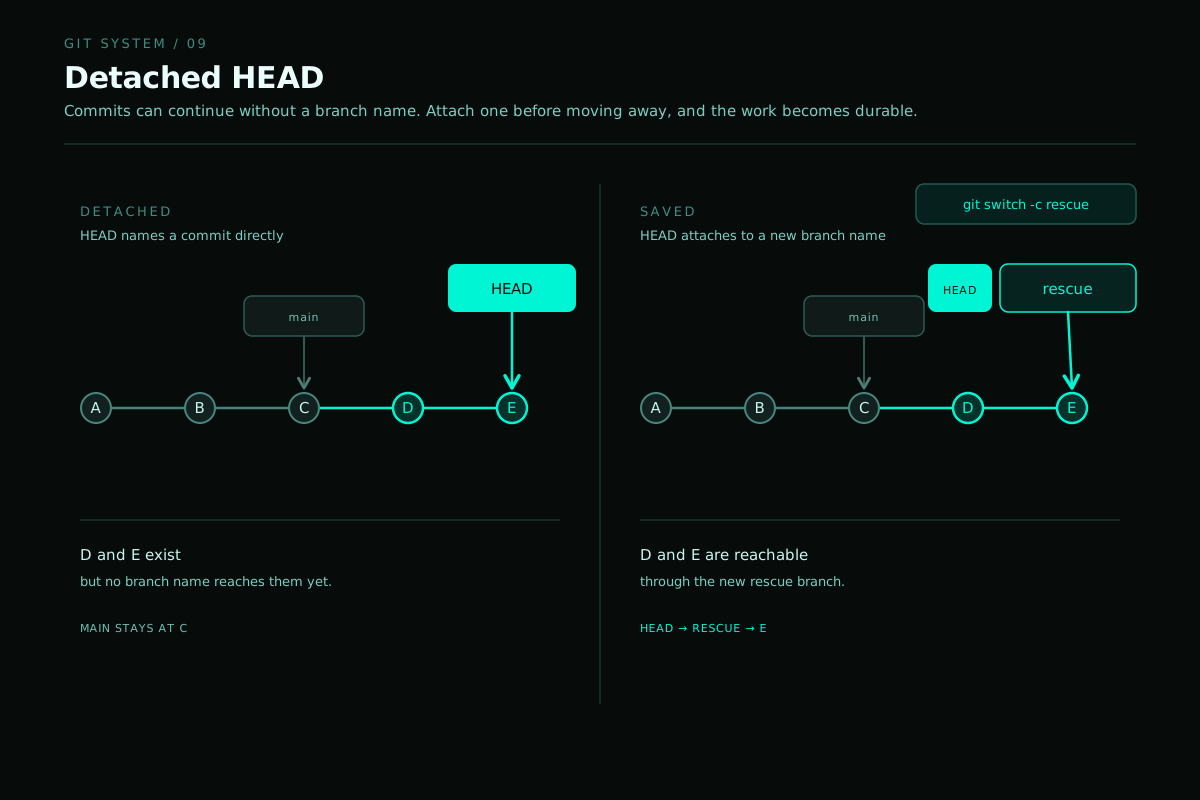
HEAD normally points to the currently checked-out branch.
In a detached HEAD state, it points directly to a commit instead.
Divergence did not make our shared history false. It meant that the same starting point no longer guaranteed the same destination.
Conflict is information
A three-way merge compares two branch tips with their best common ancestor. When both branches changed compatible regions, Git can combine them automatically. When they changed the same region incompatibly, Git stops and asks for a human decision.
<<<<<<< HEAD
our version
=======
their version
>>>>>>> other-branch
The conflict markers represent competing changes that require interpretation. They only show the location where Git had to stop.
git merge other-branch
git status

# resolve the files manually

git add resolved-file
git commit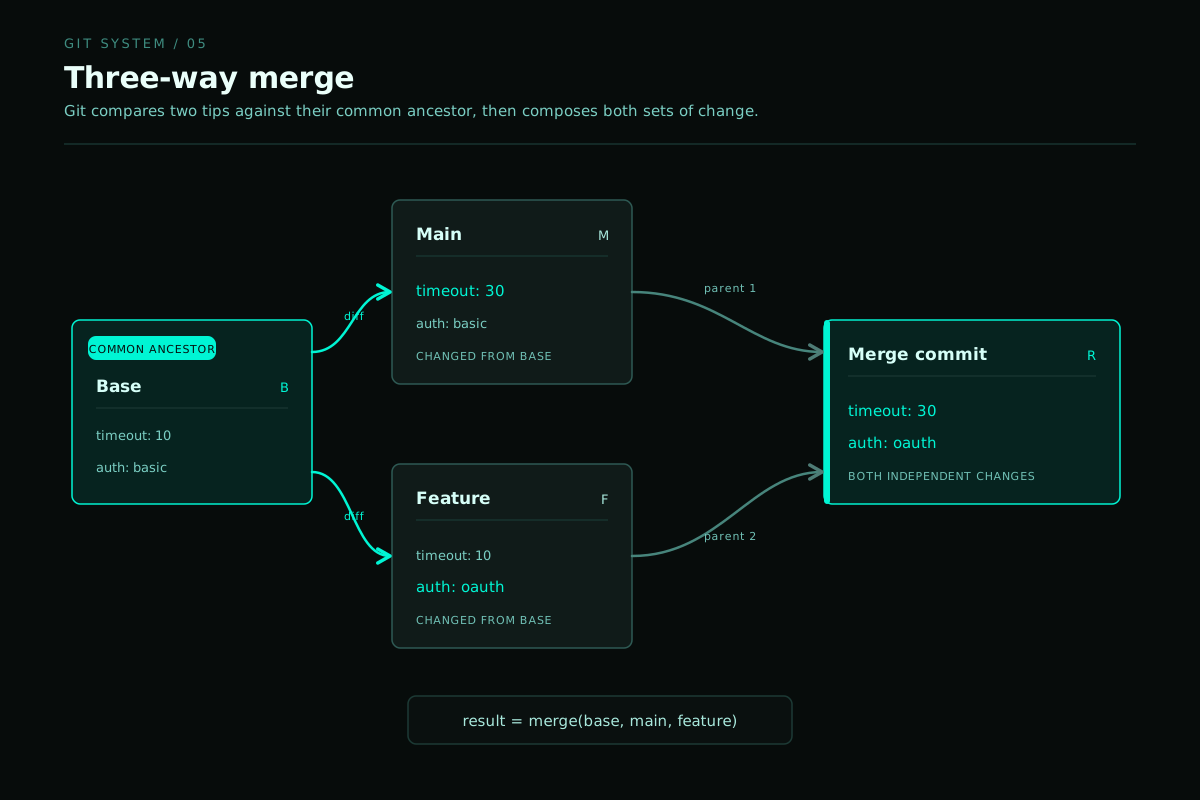
Git stops at a conflict because two incompatible changes need a human decision. Combining them automatically would hide the disagreement.
Rebase: cleaner history, different identities
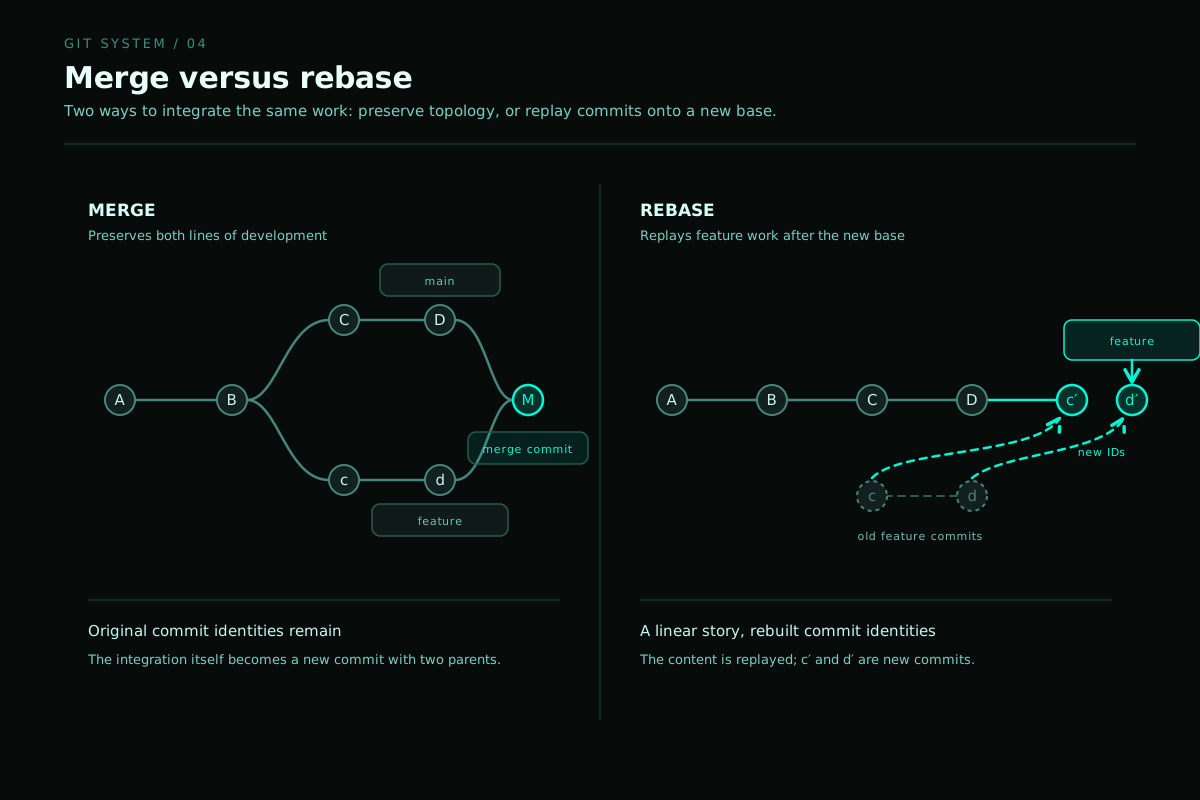
Rebasing takes a sequence of commits, temporarily removes them, moves the branch to a new base, and replays equivalent changes one by one.
git switch feature
git rebase main
The replayed commits have new parents and therefore new commit hashes. The content may appear equivalent, but the commits are new objects.
Interactive rebase provides a controlled way to edit a private sequence before sharing it:
git rebase -i HEAD~5

pick   a1b2c3 first coherent change
fixup  d4e5f6 typo in the previous change
reword a7b8c9 explain the decision properly
squash d0e1f2 combine related work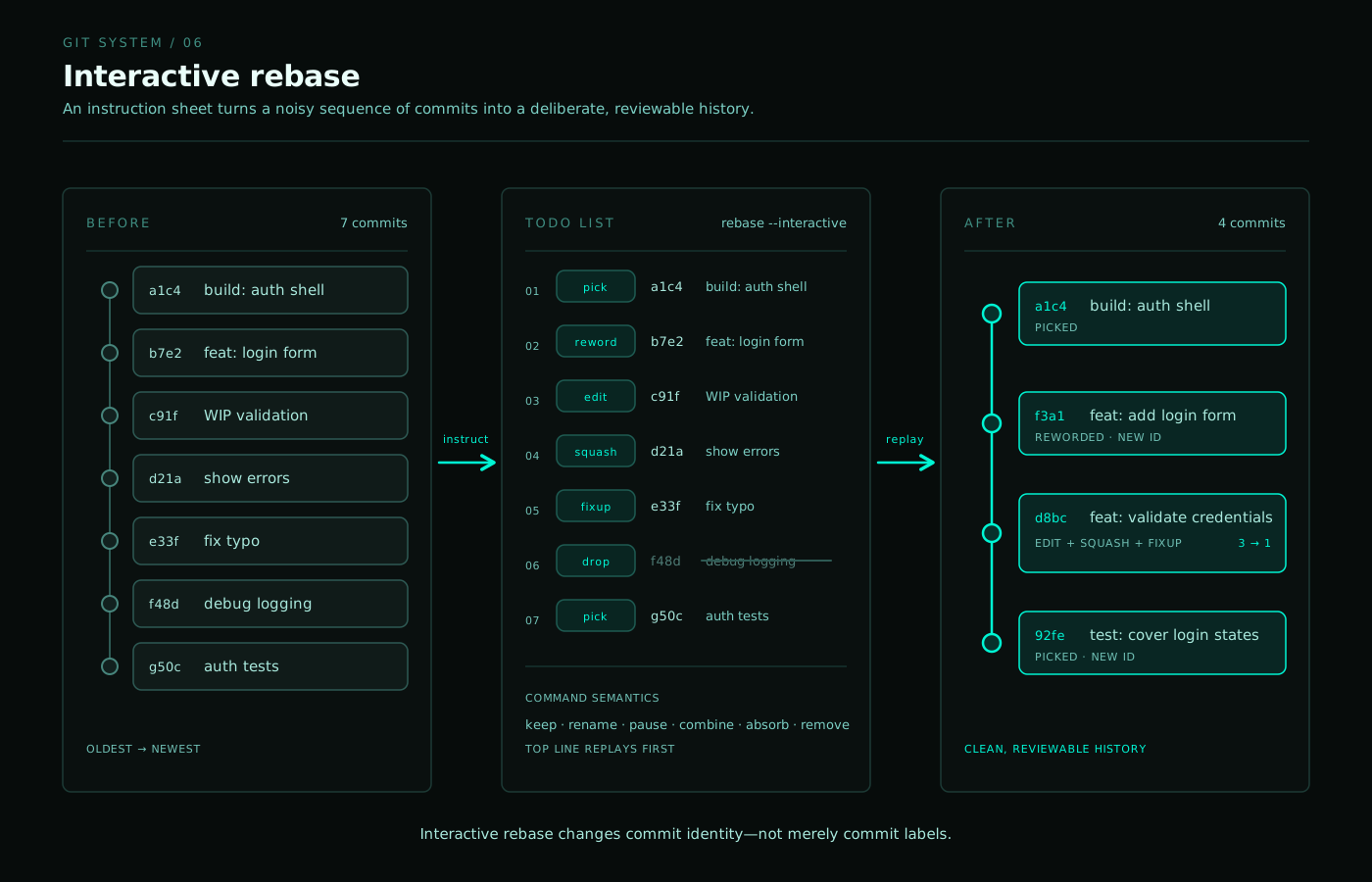

Editing a private draft is reflection, while rewriting a shared past changes history that somebody else already depends on.
Reset, restore, and revert are not synonyms
Git has several ways to undo work because "undo" can mean several different things.
git restore | Restore file content in the working tree or index. |
|---|---|
git reset | Move a branch reference and optionally update the index and working tree. |
git revert | Create a new commit that inverses an earlier commit. |
git reset --soft HEAD~1
git reset --mixed HEAD~1
git reset --hard HEAD~1

git restore path/to/file
git restore --staged path/to/file
git revert <commit>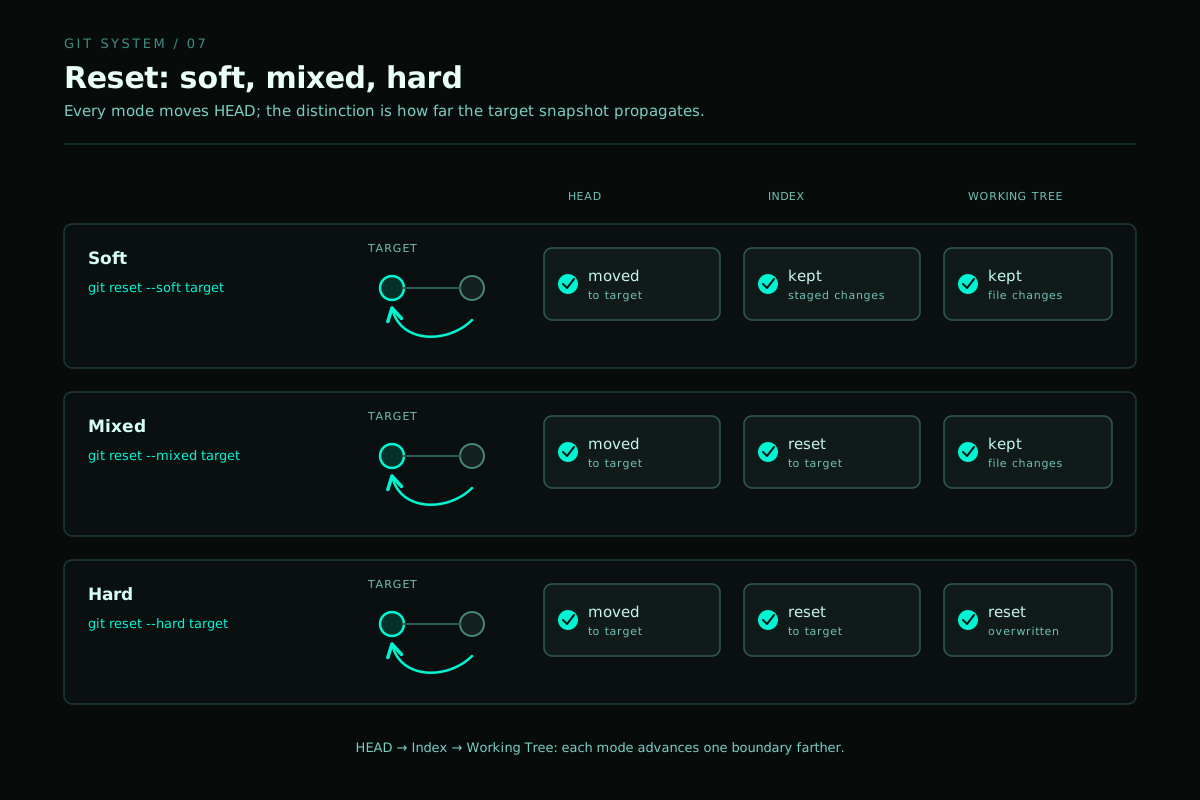
Some mistakes should remain visible because they explain what happened next without having to define the person who made them.
The reflog remembers where your references were
The reflog records local updates to references such as
HEAD. A commit that appears lost after a reset or rebase may
still be reachable through the reflog.
git reflog

git switch --detach <old-commit>
git branch recovered-work <old-commit>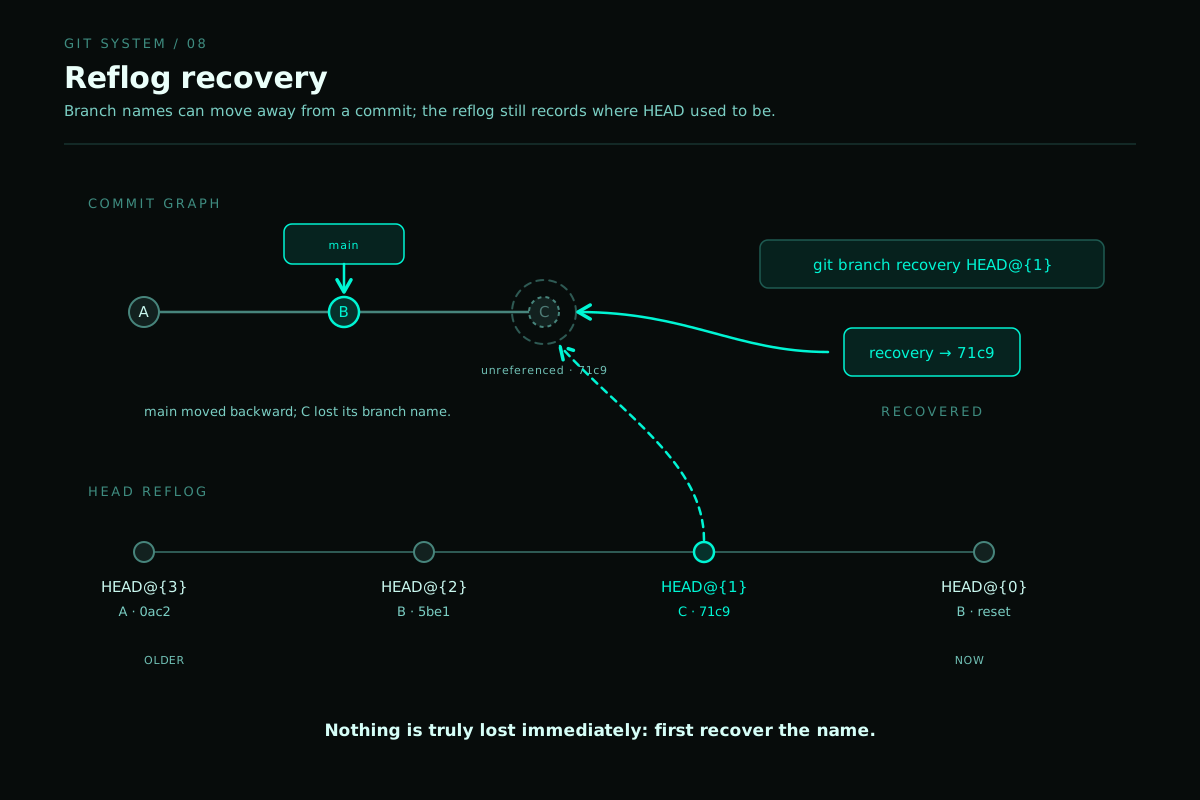
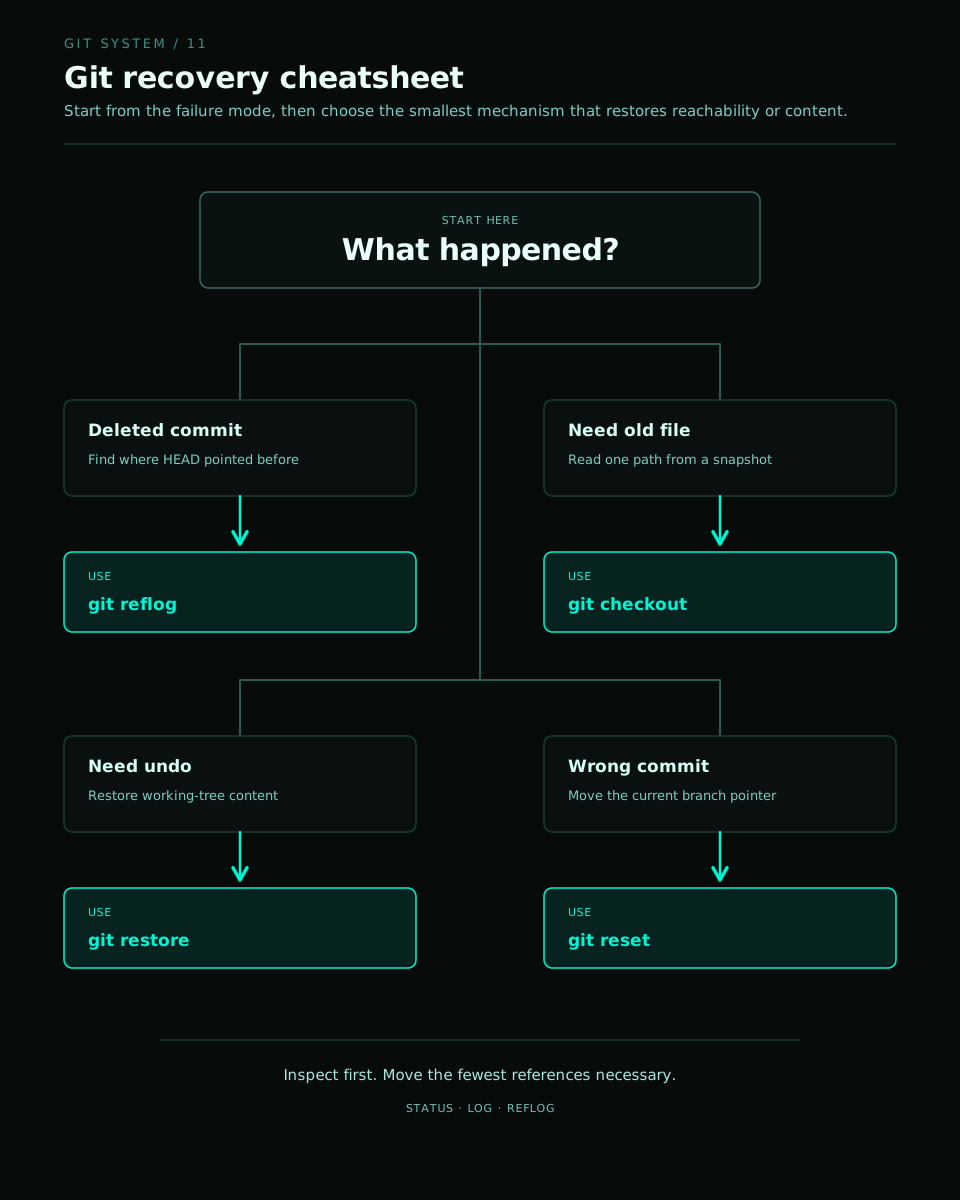
Recovery depends on evidence that still exists. Memory helped me, but it could not replace a shared record.
Shared history requires coordination
Remote-tracking branches such as
origin/main represent the last known state of a branch in
another repository. They are updated by fetching.
git fetch origin
git branch -vv
git log --oneline --graph --decorate --all

git pull --ff-only
git push
git push --force-with-lease
--force-with-lease is safer than an unconditional force
push because it refuses to overwrite the remote branch when it has
changed in an unexpected way.
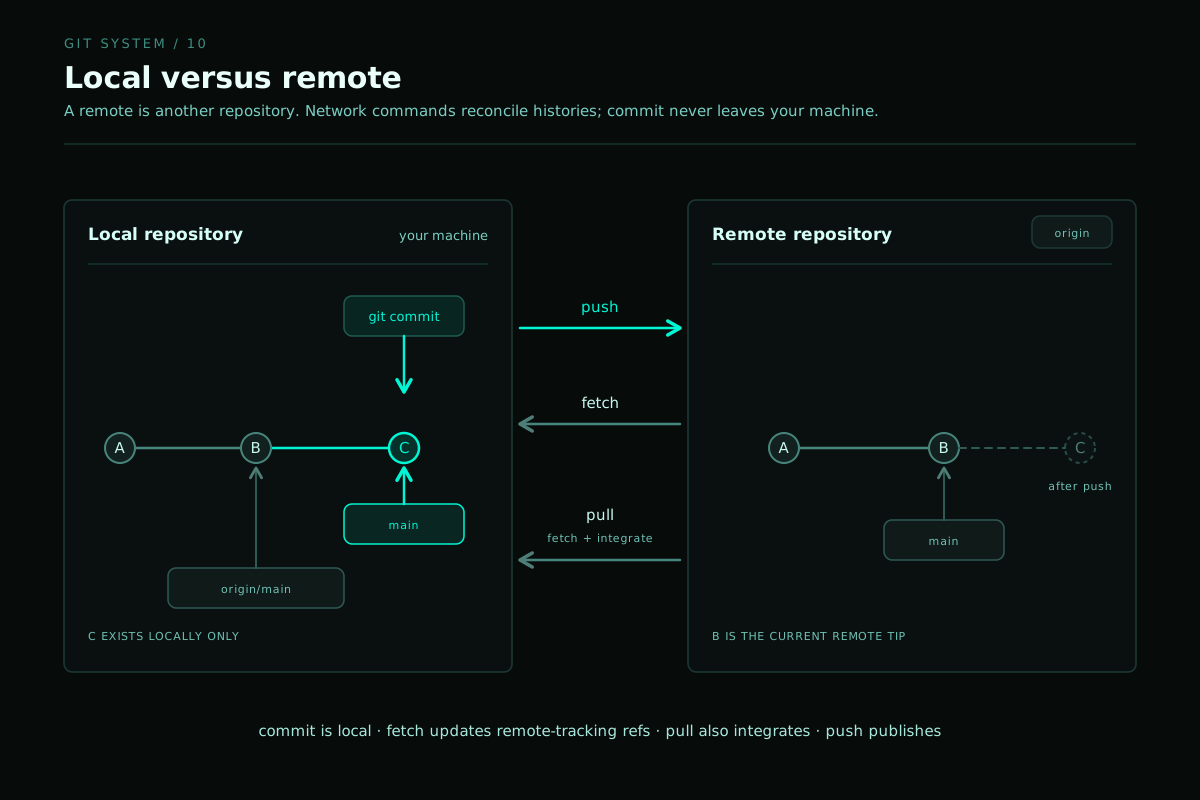
I can rewrite my own draft. Before changing a shared history, I need to know what changed for the other person.
What Git cannot save
Git preserves ancestry, identifies divergence, exposes conflicting changes, and recovers work that appeared lost. It can also show a team exactly how a system reached its current state.
Git cannot decide what a person meant, make an unspoken change visible, or guarantee that two branches still want to merge. Those were the parts I needed, and they had never been committed anywhere.
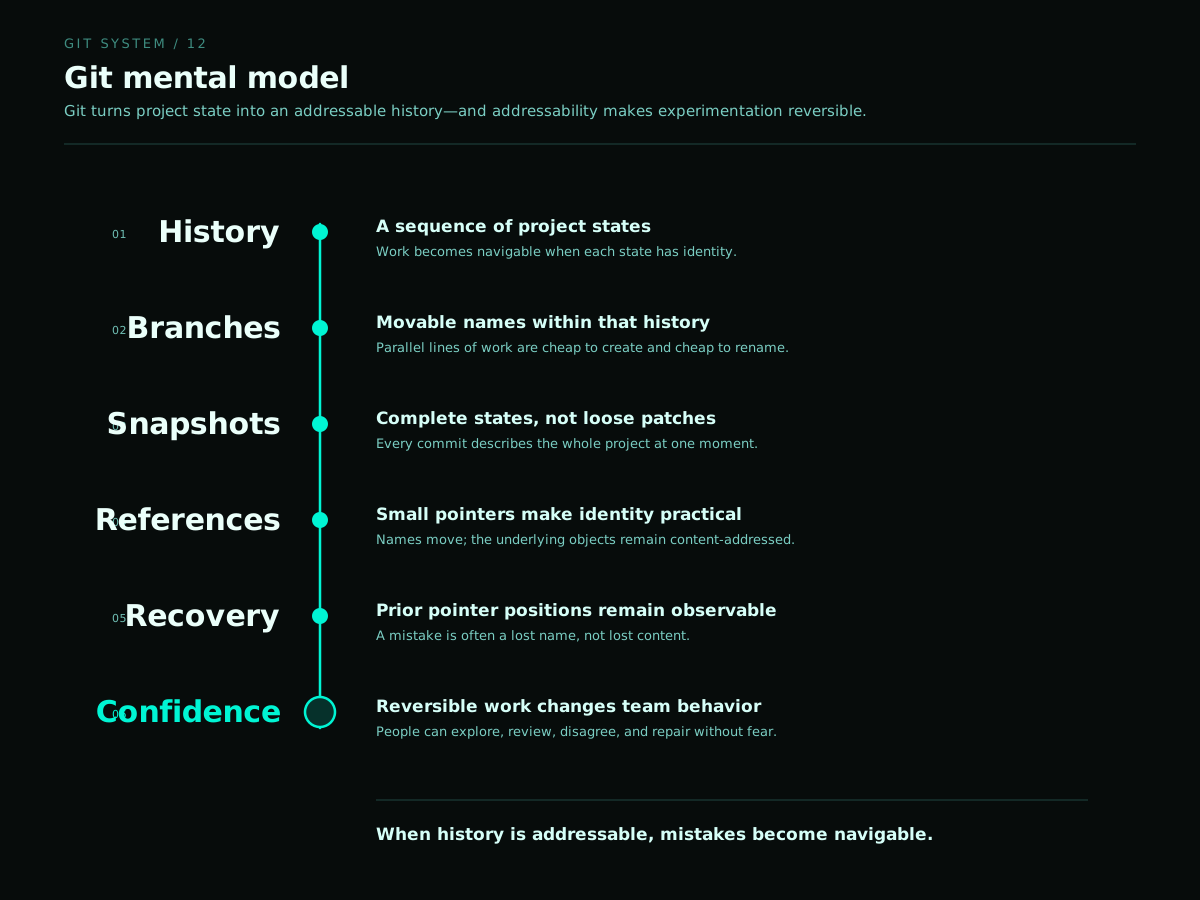
Good version control cannot prevent mistakes. It keeps the sequence of decisions readable after they happen.

git status, so good communication really do matters lol.